InboxAlly Review: Is It Worth It for Email Deliverability?
Your email platform says the campaign was delivered. Your customer says they never saw it. Both can be true. “Delivered” only means the receiving mail server accepted your email. It doesn’t tell you whether Gmail or Outlook put it in the inbox, a Promotions tab or the spam folder.
That gap is what email deliverability is about. Deliverability is simply your ability to get email in front of people, in the inbox, where they’ll actually see it. InboxAlly is a tool built to help you see where your email lands and to improve that placement over time.
This review covers what InboxAlly does, who it’s for, how it fits next to the email platform you already use, what it costs and whether it’s worth it for you. If you want the background first, learn why delivered emails can still land in spam.
Watch: How InboxAlly Works
In just over two minutes, the video walks through why a delivered email can still go to spam, how the free Email Placement Tester works, what InboxAlly’s engagement settings do, and how sender profiles and reports help you follow results over time. It ends with who should try InboxAlly and where to start.
The video is sponsored by InboxAlly.
What is InboxAlly?
InboxAlly is an email deliverability platform. It does two connected jobs. First, it shows you where your email lands at major mailbox providers such as Gmail, Outlook and Yahoo. Second, it uses a network of mailboxes it manages, called seed accounts, to interact with your email in ways that send positive signals to those providers.
The problem it solves is invisible spam. Most email platforms report sends, deliveries, opens and clicks, but not which folder the message went to. If a chunk of your list is quietly getting your email in spam, your reports just look like a slow week.
InboxAlly doesn’t replace your email service provider (ESP). An ESP is the platform you use to build and send campaigns, such as Mailchimp, HubSpot, Klaviyo or ActiveCampaign. You keep sending from it. InboxAlly works alongside it: you add InboxAlly’s seed addresses to your list, the same way you’d add any subscriber. InboxAlly says it needs no integration and no access to your sending account, so you don’t hand over a password or API key.
InboxAlly positions the platform for more than warming up a brand-new domain. It’s also built for ongoing campaigns, recovering a damaged sender reputation and moving from one ESP to another.
Who is InboxAlly for?
InboxAlly makes most sense when missing the inbox costs you real money or credibility. That usually means one of these groups:
- Email marketers. You send newsletters or promotions and want to know whether a dip in opens is a content problem or a spam-folder problem.
- Agencies. You manage email for several clients. Workspaces let you switch between accounts, and each client’s sending address can get its own sender profile.
- Deliverability consultants. You need placement data by mailbox provider to show a client where mail lands before and after you fix their setup.
- Businesses that run on email. Sales follow-ups, renewals, onboarding and order updates all lose value when they sit in spam.
- Senders with a spam-folder problem. Your platform reports “delivered” but replies, clicks and sales have dropped, and you suspect mail is being filtered.
- Teams moving to a new email platform. A move to a new ESP often means new sending infrastructure. Placement tests before and after the switch show whether anything changed.
- Businesses with several senders or brands. Each sender profile ties to one verified From address, so a sales team, a newsletter and a support address can be tracked separately.
Key features
These are the features the video walks through, plus the free tool InboxAlly offers before you commit to a plan.
1. Email placement testing
Placement testing answers one question: when you send a real email, where does it land? InboxAlly gives you a list of test addresses at different mailbox providers. You send your email to them from your normal platform, and InboxAlly reports whether each copy reached the inbox, went to spam or didn’t arrive.
Use it before a big campaign, after changing your email setup, or whenever results drop without an obvious reason. It tells you whether to fix the message or the sending first. Placement testing is included on every paid plan.
2. Engagement settings
Mailbox providers watch how people treat your email. Opens, replies and rescuing a message from spam tell Gmail or Outlook that people want your mail. Ignoring it or marking it as spam tells them the opposite.
InboxAlly’s seed accounts are real mailboxes that InboxAlly manages. When your email reaches them, they interact with it the way an interested reader would. Depending on the provider, that can mean opening it, scrolling through it, clicking a link, replying, marking it important, or moving it out of spam or the Promotions tab. InboxAlly lists seven engagement actions, randomized and run at a human pace. Engagement settings let you pick a preset or adjust how often each action happens.
Keep the limit in mind. Seed engagement adds to the signals providers see, but it doesn’t replace how your real subscribers respond. If people on your list keep marking your email as spam, seed accounts can’t outvote them.
3. Sender profiles
A sender profile connects one verified From address, such as news@yourbrand.com, to its own engagement settings and reporting. That matters when one business sends from several addresses, or when an agency handles email for several clients. Each sender’s results stay separate, so one client’s problem doesn’t hide inside another’s numbers. Starter includes one sender profile, Plus five, Premium ten and Enterprise unlimited.
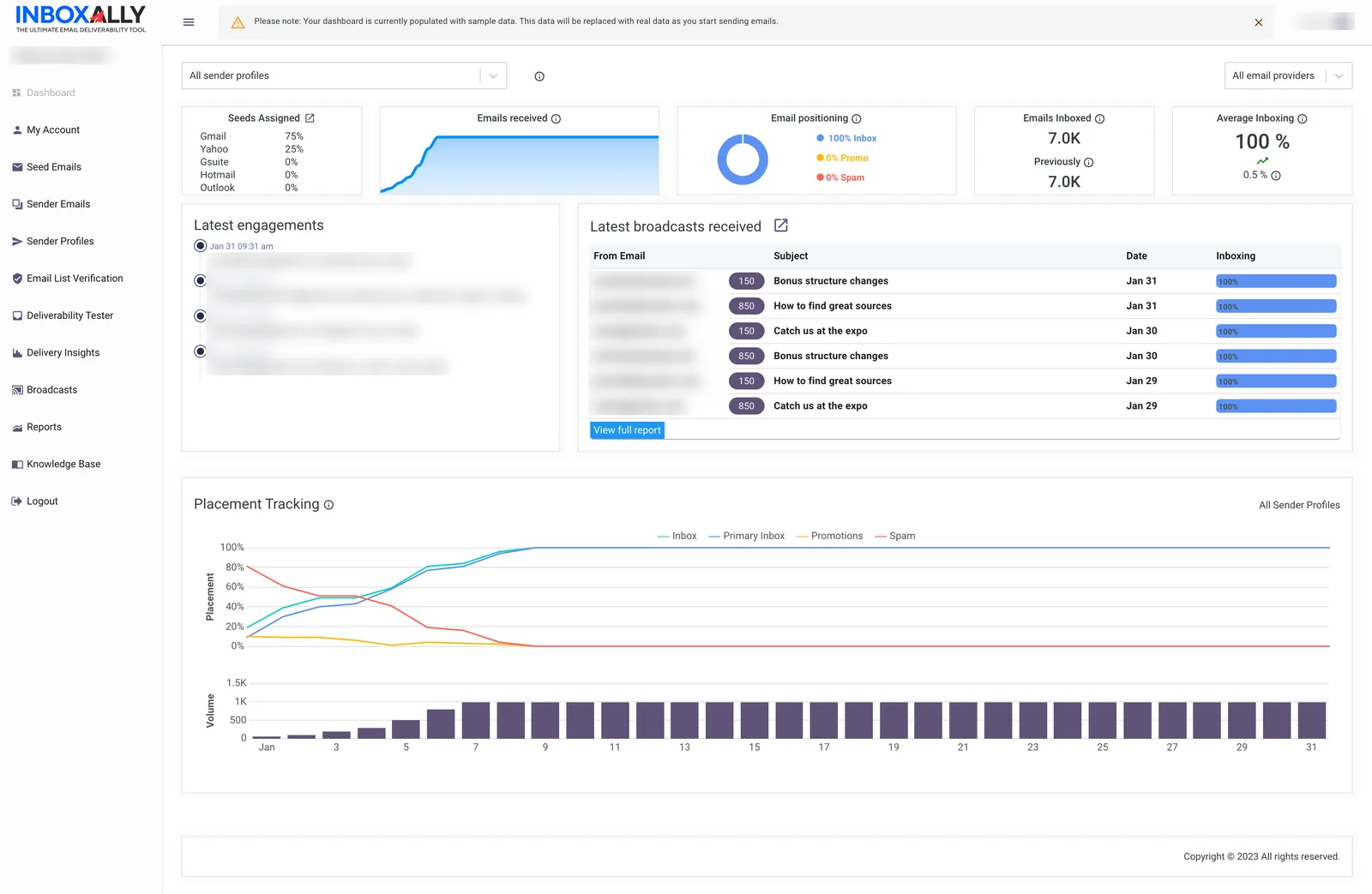
4. Dashboard and reporting
The dashboard gives you an overview of each sender’s activity, and reports let you follow inbox placement over time rather than judging from one send. InboxAlly also shows its own IA Score, a daily estimate from 0 to 100% of how much of your mail reaches the inbox, based on its seed placement data. InboxAlly labels 95 to 100% Excellent, 85 to 94% Good, 70 to 84% Fair and below 70% Needs Attention.
Read the IA Score as InboxAlly’s model, not data from Gmail or Microsoft. Pair it with free provider tools such as Google Postmaster Tools. Every plan also includes blacklist monitoring, DMARC reporting (DMARC is the email-authentication record that tells providers what to do with mail that fails your domain’s checks), a REST API and native HubSpot and Klaviyo integrations.
5. The free Email Placement Tester
The easiest way to see whether you have a placement problem is InboxAlly’s free Email Placement Tester. As of October 29, 2026, it needs no signup or credit card. You get a list of 16 test inboxes at Gmail, Outlook and Yahoo, copy them or download them as a CSV, and send a real campaign to them from your normal email platform. Within minutes, the report shows each address as Inbox, Spam or Missing.
It allows one free test per day, and the test addresses are only for testing. One test is a snapshot of one email, not a verdict on your whole program. It’s still a quick, free way to find out whether to dig deeper before you pay for anything.
Try the Free Email Placement TesterHow InboxAlly works, step by step
- Keep using your existing email platform. Nothing about how you build or send campaigns changes, and InboxAlly doesn’t need your ESP login.
- Set up InboxAlly. Add your sender email address and confirm it through a verification link, then create a sender profile for that From address and choose an engagement preset or adjust the settings yourself.
- Send to InboxAlly-managed accounts. Download your seed addresses and add them to the list you send to. Your normal campaigns, or a test send, now reach InboxAlly’s seed accounts too.
- Monitor engagement and placement. InboxAlly records where each seed copy landed and runs your engagement settings. Its docs say most engagement happens within about four hours of a send.
- Review reports and progress over time. Watch placement and the IA Score week to week. InboxAlly’s own guidance is that a full reputation repair typically takes 4 to 8 weeks.
How many seed addresses do you need? InboxAlly’s rule of thumb is seeds equal to about 5% of your daily sends, counted per sending domain. So Starter’s 100 seeds a day fits roughly 2,000 daily sends from one domain. Treat that as the vendor’s guideline, not an independent benchmark.
InboxAlly vs. your email service provider
| Your ESP | InboxAlly | |
|---|---|---|
| Main job | Create, manage and send campaigns | Inbox placement, sender reputation and monitoring |
| Sends your email | Yes | No |
| Typical reports | Deliveries, opens, clicks, unsubscribes | Inbox vs. spam by provider, IA Score, blacklists, DMARC |
| Examples | Mailchimp, HubSpot, Klaviyo, ActiveCampaign | Works next to any of them |
Do I need both?
Not always. Plenty of businesses never need a separate deliverability platform. If you send to a list that opted in, your domain is authenticated (SPF, DKIM and DMARC, the records that prove your mail really comes from you) and replies and sales look healthy, your ESP’s reports and the free placement test may be all you need.
A specialized tool earns a look when email is business-critical, when you see ongoing inbox-placement problems, when you’re moving to a new ESP or domain, or when you manage email for clients and need proof of where it lands. In those cases, knowing where mail lands, and having a way to work on it, can be worth the extra line on the software bill. For the ESP side, see our best platforms for deliverability.
Pros
- Works alongside any ESP you already use
- No access to your sending account required
- Free Email Placement Tester to check before you pay
- Sender profiles keep each address or client separate
- Placement reports, blacklist monitoring and DMARC reporting on every plan
- Useful for agencies, with Workspaces for client accounts
- Built for ongoing campaigns, recovery and migrations, not just warmup
- 10-day free trial, no credit card required
Cons and things to consider
- Another monthly software cost: $149 on Starter, $645 on Plus
- Not every business needs a dedicated deliverability platform
- You’ll get more from it with a basic grasp of deliverability
- Placement results come from test inboxes and can’t guarantee every subscriber’s inbox
- Won’t fix list quality, consent or content problems
- The IA Score is InboxAlly’s model, not mailbox-provider data
Pricing
InboxAlly prices by how many seed emails you can use each day and how many sender profiles you need, not by list size. Prices are USD, billed monthly. Every plan starts with a 10-day free trial, no credit card required.
| Plan | Price | Seed emails | Sender profiles | Support |
|---|---|---|---|---|
| Starter | $149/mo | 100 a day | 1 | Email and live chat |
| Plus | $645/mo | 500 a day | 5 | Email and live chat |
| Premium | $1,190/mo | 1,000 a day | 10 | Email, live chat and phone; 1-hour setup session plus weekly 30-minute progress sessions |
| Enterprise | Contact sales | Thousands a day | Unlimited | Email, live chat and phone; dedicated deliverability experts |
Pricing checked on November 1, 2026 on InboxAlly’s pricing page. Starter support (email and live chat) was confirmed by InboxAlly on November 1, 2026; its pricing page is being updated to match.
Features barely change between plans. Every plan includes placement testing, the IA Score and IA Reputation ratings, Adaptive Autowarmup, the IA Assistant, blacklist monitoring, DMARC reporting, the REST API and the HubSpot and Klaviyo integrations. Starter works out to $1.49 per daily seed, Plus $1.29 and Premium $1.19, so upgrade when you need more seeds or more sender profiles, not for features.
How does the price compare with warmup tools?
Warmup tools such as MailReach and Warmup Inbox charge per mailbox. MailReach’s All-In-One plan is $25 per mailbox a month for one to five mailboxes, and Warmup Inbox Basic is $19 per inbox a month billed monthly (prices checked October 19, 2026). For a solo salesperson warming five cold-outreach mailboxes, that’s about $95 to $125 a month, against $645 for InboxAlly Plus to get five sender profiles. For one marketing domain sending a few thousand emails a day, InboxAlly Starter, with placement testing and DMARC reporting included, is the closer fit.
Is InboxAlly worth it?
InboxAlly is worth a serious look if email is a meaningful part of how you make money and you can’t afford to guess whether it reaches the inbox. The case is strongest for businesses that depend heavily on email, agencies handling several clients, teams dealing with spam-folder or placement problems, businesses moving to a new email platform and anyone who wants clearer visibility into where their mail lands.
It’s less compelling if your mail already reaches the inbox and email is a small part of your business. In that case $149 a month mostly buys confirmation. And no tool replaces the basics: an opted-in list, authenticated sending and email people want. Fix those first, because seed engagement can’t outvote spam complaints from real subscribers.
The sensible path is the low-risk one. Run the free Email Placement Tester on your next real campaign. If it shows mail landing in spam or going missing, start the 10-day trial and watch your own results, including Google Postmaster Tools, over the following weeks. Results vary by sender, so judge it on your own data.
Start with the free test, then decide.
Paid partnership with InboxAlly. BestSends earns a commission if you start a paid plan through our link. The tester is free, and the trial needs no credit card.
InboxAlly FAQ
What is InboxAlly?
InboxAlly is an email deliverability platform. It helps senders see where their email lands (inbox, spam or missing) and builds positive engagement signals using a network of mailboxes InboxAlly manages, called seed accounts. It works alongside the email platform you already use.
What does InboxAlly do?
You add InboxAlly’s seed addresses to your normal sends. InboxAlly reports where each message landed at providers such as Gmail, Outlook and Yahoo, and its managed accounts interact with your email, for example opening it, scrolling, clicking a link, replying or moving it out of spam. Dashboards and reports track the trend over time.
Is InboxAlly an email service provider?
No. An email service provider (ESP) is the platform that builds and sends your campaigns. InboxAlly does not send your marketing email. It focuses on inbox placement, sender reputation and the monitoring around them.
Does InboxAlly replace Mailchimp, HubSpot, Klaviyo, or ActiveCampaign?
No. You keep using Mailchimp, HubSpot, Klaviyo, ActiveCampaign or whichever platform you send from. InboxAlly works next to it, and it does not need your login to that platform. It also offers native HubSpot and Klaviyo integrations and an API if you want them.
What is email inbox placement?
Inbox placement is where an accepted email ends up: the main inbox, a tab such as Promotions, or the spam folder. Delivery only tells you the receiving server accepted the message. Placement tells you whether a person is likely to see it.
Why can a delivered email still go to spam?
“Delivered” means the recipient’s mail server accepted the email. After that, the mailbox provider decides where to put it, based on signals such as your sender reputation, your sending habits, how recipients engage with your mail, your content and whether your domain is set up and authenticated correctly. An accepted email can still be filed in spam.
What is sender reputation?
Sender reputation is the trust score mailbox providers like Gmail and Outlook keep for your sending domain and IP address. It is built from things like spam complaints, bounces, how consistently you send and how people interact with your email. A strong reputation makes inbox placement more likely; a weak one pushes mail toward spam.
Is InboxAlly only for email warmup?
No. Warmup, gradually building a reputation for a new domain or address, is one use. InboxAlly also positions the platform for ongoing campaigns, recovering a damaged reputation and switching ESPs, with placement testing, blacklist monitoring and DMARC reporting included on every plan.
Can agencies use InboxAlly?
Yes. InboxAlly offers Workspaces so agencies and owners of several lists can switch between client accounts, and each client sending address can have its own sender profile. The number of sender profiles depends on the plan, from one on Starter to unlimited on Enterprise.
Does InboxAlly have a free tool?
Yes. The free Email Placement Tester gives you a list of test inboxes at Gmail, Outlook and Yahoo. You send a real email to them from your normal platform and see whether it landed in the inbox, in spam or went missing. As of October 29, 2026 it needs no signup and allows one free test per day.
Is InboxAlly worth it?
It can be if email drives meaningful revenue, you manage email for clients, you are fixing a spam-folder problem or you are moving to a new platform. If your mail already reaches the inbox and email is a small part of your business, start with the free placement test and your ESP’s own reports before paying from $149 a month.
Sources
- InboxAlly pricing and plan comparison (checked Nov 1, 2026)
- InboxAlly free Email Placement Tester (checked Oct 29, 2026)
- InboxAlly homepage: works with your existing ESP (checked Oct 29, 2026)
- InboxAlly docs: How InboxAlly works (checked Oct 19, 2026)
- InboxAlly docs: Quick start guide (checked Oct 19, 2026)
- InboxAlly docs: Understanding your IA Score (checked Oct 19, 2026)
- MailReach pricing (checked Oct 19, 2026)
- Warmup Inbox pricing (checked Oct 19, 2026)